Scrape and Reverse Engineer Ad Creatives in Minutes
Try Text
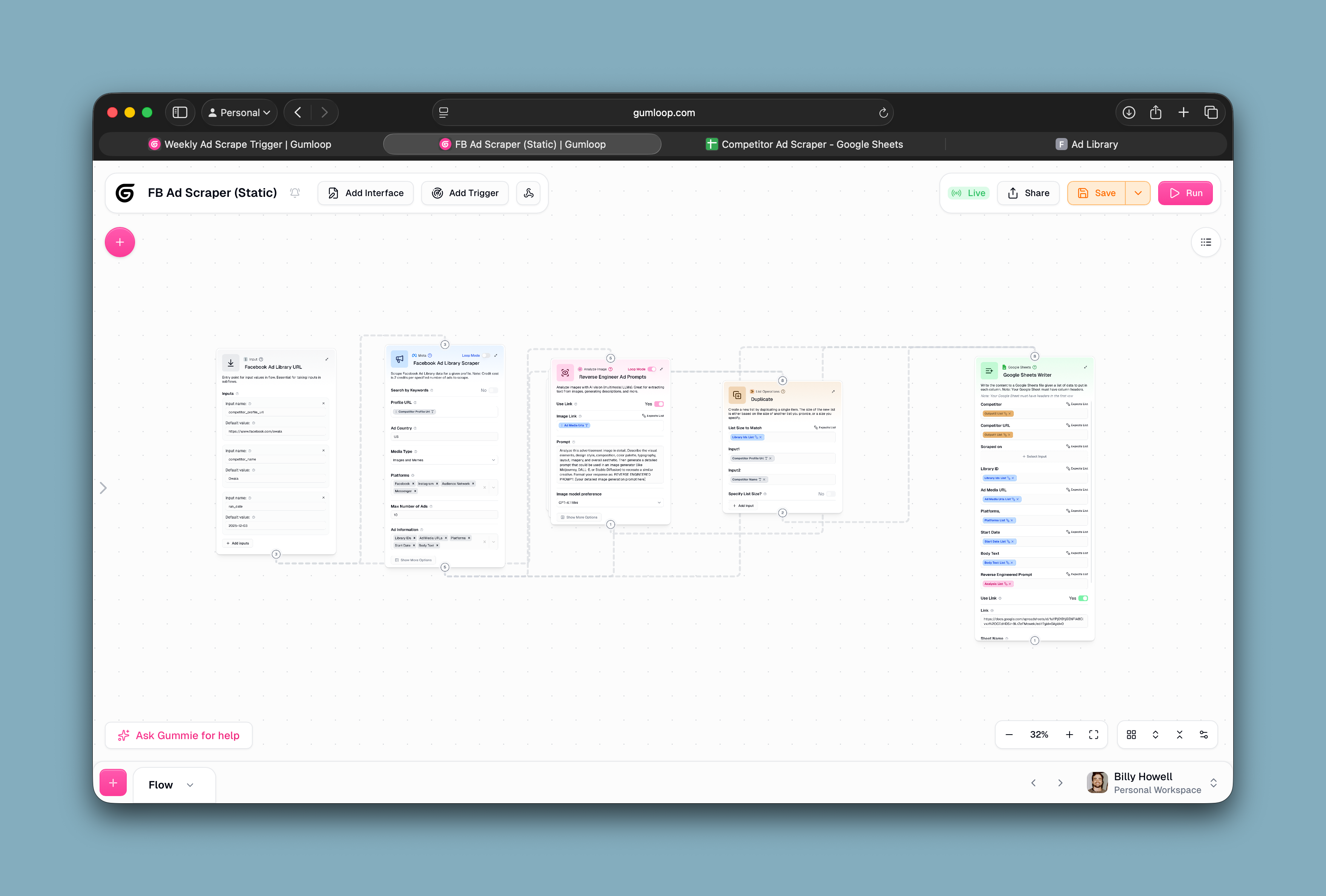
The Rundown You can use Gumloop to scrape (almost) anything and analyze it with AI. This workflow scrapes your competitors’ Facebook Ads and reverse engineers the prompt you’d need to recreate that ad with AI. If you’ve never used Gumloop before, this is the perfect starter project. The best part is you can do it on a free account and only need to connect your one integration to make it all work! Who is this useful for People interested in Gumloop but haven’t taken the plunge yet People who want to learn to set up automated scrapers Anyone running Facebook Ads Here’s what you will build This Gumloop flow will scrape any Facebook Ad library and reverse engineer a prompt to recreate each ad creative. Step 1: Create a new Flow in Gumloop Note: Gumloop is generous with their free credits. You can build this whole flow on a free account. Go to Gumloop click “create flow” button and enter the following prompt: Make a flow that takes a url to Facebook ad library account and scrapes all of its static (not video) ads and puts all of the data in a new row in a google sheet. It sends the static creative image to AI with a prompt telling it to reverse engineer a prompt you could put into an image generator to get the creative generated 💡 Pro Tip: You can use Gumloop’s agent to build this out for you or you can build it out manually by clicking the start with trigger or integration options. In the video guide I did it manually but you can always ask the agent for help while you’re in a flow. Step 2: Set Up Your Google Sheet Make a new Google Sheet that looks like this. If you’re lazy, you can duplicate this sheet here . 💡 Pro Tip: The Gumloop agent should tell you exactly what headers to put in your sheet. But even if you use this template, once you link it in the next step the agent will adjust to your column headers. Step 3: Connect your Google Sheets Account After the google sheets module is added you will need to click the “Authenticate Credentials” button and connect your Google account. Don’t worry, you won’t need to add anymore credentials after this step! Once you’ve connected your account, paste the link to your Google Sheet into the module and click continue in the agent sidebar. Step 4: Test your New Flow Go to https://www.facebook.com/ads/library and search for a competitor. Verify that they have static image ads. Click on their name to go to their profile. Copy the link to their profile Paste the link into your first module Make sure your flow looks like this. Don’t worry if you’re missing the extra two inputs. They’re only needed if you’re running this on a schedule and want to record when it was run. Click the big pink “Run” button. Step 5: Automate your Flow Next we’re going to set up an weekly automation that looks at a list of your competitors and pulls ads for each of them. Manually create a new flow that will trigger the scraping. It will look like this: Make a new tab in your Google sheet with Columns “Competitor Name” and “Competitor Profile URL” Go back to Gumloop and click start with integration option Select Google Sheets Reader. Add the link to your sheet and select the new tab Click the “+” button and find the “Time Trigger” and configure it to run when you want (weekly should be fine) Click the “+” button again and find your scraper flow under “subflow”. Connect it to your Google Sheets Module Add your Google Sheets Competitor Profile URL as the input to your subflow Save your flow and run a test run if you like. Going Further If you look at the flow screenshots or watch the video guide you can learn how to pull extra information like flow run date and competitor name into your sheet using the “Duplicate” module. Read this Gumloop Doc on Loop Mode to fully understand the concept. It’s the #1 area beginners get tripped up in Gumloop. Use the same flow setup to scrape and analyze video ads. You can even scrape Reddit threads, Tiktok videos, Tweets and more. Add a generate image module to automatically create images based on scraped ads.

Save 15% on Thoughtly by joining The Runway University
Through our vast network of over 100 partnerships with major AI companies, we also offer University members free access or major discounts to the many popular AI tools along with AI certified courses, daily guides on AI tools and many more.
Tools


AI training for the future of work.
Get access to all our AI courses, hundreds of real-world AI use cases, live expert-led workshops, an exclusive network of AI early adopters, and more.