Run Your Own Coding Agent on Your Laptop (for Free)
Try Text
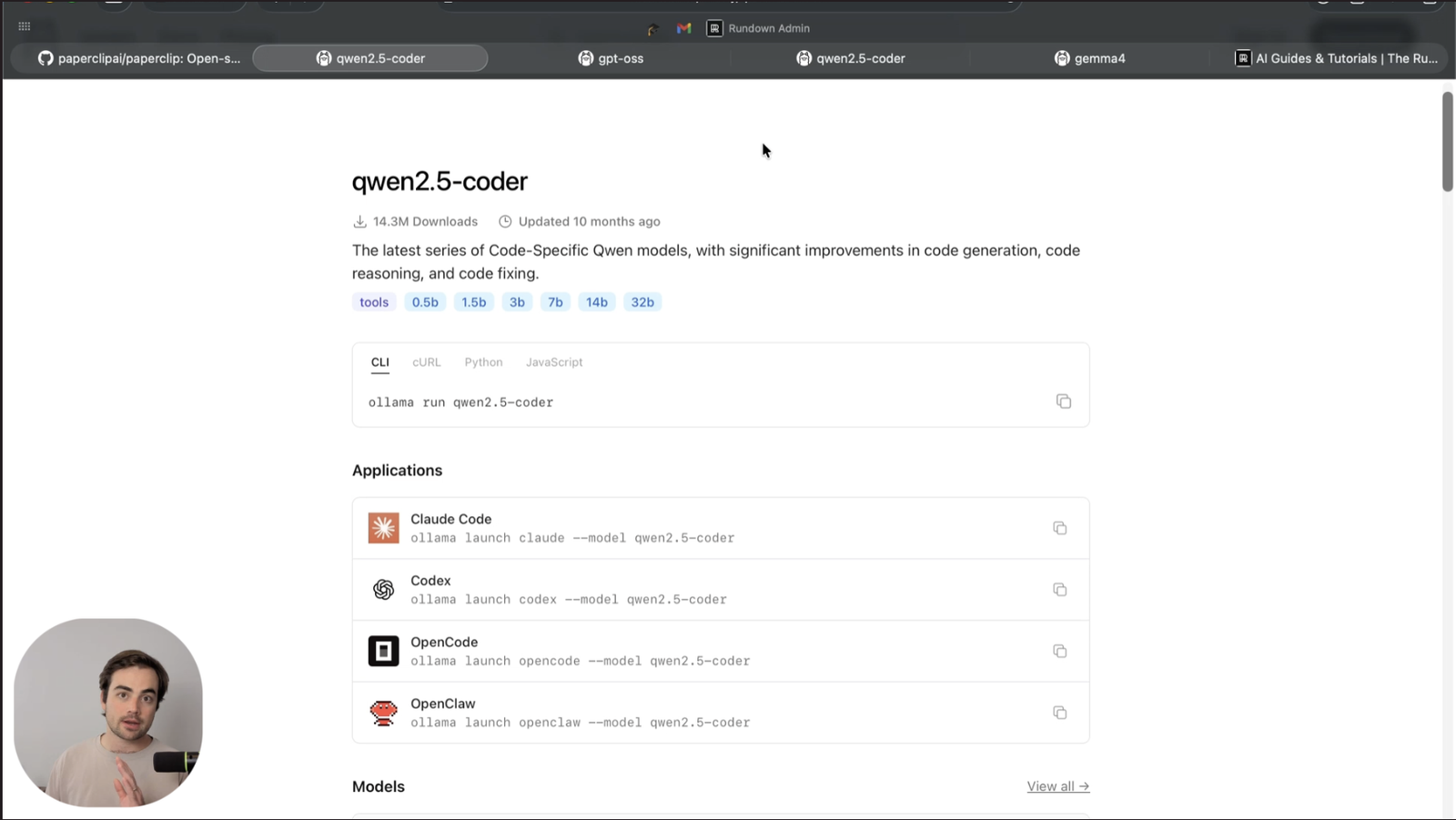
The Rundown In this guide, you will learn how to download a coding LLM to your laptop using Ollama and wire it into Claude Code or Codex with a single command. You will be able to run your coding agent for free on simple tasks and keep proprietary code entirely on your machine. Who This Is Useful For Solo devs and indie founders paying $100-200/mo for Claude Code Max or Codex Pro on work that does not need frontier reasoning Students, hobbyists, and new coders who want a working agentic setup to practice on for free Anyone working on proprietary or NDA code who wants the whole loop to stay on their laptop What You Will Build A local Claude Code (or Codex, or OpenCode) session pointed at a free Ollama model running on your own hardware. Same agent, same interface, zero per-token cost, nothing leaving your machine. What You Need to Get Started Ollama installed. If you do not have it, follow our Ollama install guide first Claude Code signed in and working, or OpenCode (installer in Step 5) A terminal and a project folder you actually want to work in 16 GB of RAM is ideal. 8 GB works with smaller models. 32 GB+ is better. Step 1 Check Your Hardware and Ask an LLM What to Run Before you pull anything, know what your machine can handle. On Mac: Apple menu > About This Mac > screenshot the specs panel. On Windows: Settings > System > About > screenshot. Drop that screenshot into Claude, ChatGPT, or any LLM, and ask: "Which Ollama coder models can I realistically run on this machine with Claude Code or Codex?" It will read the RAM and chip off your screenshot and give you a short list. Rough guide to what fits where: Your RAM Recommended size Example 8 GB 3B params or smaller qwen3-coder:3b 12 GB 4-7B params gemma4:e2b , qwen3-coder:7b 16 GB 7-12B params qwen3-coder:7b , gemma4:e4b 32 GB+ or GPU 20B+ qwen3-coder:32b , gpt-oss:20b , gemma4:26b Pro tip: Download the biggest version you can reasonably fit. Bigger means more reliable tool calls, which is the thing that actually breaks small models inside Claude Code. Step 2 Pick a Coder Model That Supports Agentic Tools Browse ollama.com/search?q=coder and open the page for a model your LLM recommended. Critical check: scroll to the Applications section on the model page and confirm it lists Claude Code, Codex, OpenCode, or OpenClaw. If it lists none of them, the model does not support the tool calls agentic coding requires. Skip it. The three that held up best in our testing: qwen3-coder is the purpose-built coder pick. Strong raw code generation at its size. gemma4 has explicit tool-use and thinking training. Handles multi-step tool chains more reliably. gpt-oss is OpenAI's open-weights MoE model with strong agentic support. Pro tip: If you cannot choose between two candidates, pull both. Disk is cheap and you can swap between them with the --model flag. Keep the one that actually holds up on your workflow. Step 3 Launch Your Coding Agent With the Local Model From the model's Ollama page, copy the launch command. It looks like: ollama launch claude --model gemma4:e4b Open a terminal in your actual project folder, paste the command, and hit enter. Confirm the download when it prompts you, then wait for the weights to pull the first time. After that, Ollama drops you into Claude Code pointed at the local model instead of Anthropic's API. Inside the session, type /model to confirm which model is wired in. Every response from here costs zero tokens. Pro tip: Run ollama ps in a second terminal to see what is actually running. It shows the active model, RAM in use, and GPU utilization. 100% GPU means you are fully accelerated. Anything lower means part of the model is spilling to CPU, and responses will be slower. Step 4 Bump the Context Window Before You Do Anything Serious This is the single most important setting in the whole setup. By default, Ollama allocates only 4K of context per model, which is way too small for agentic coding. Claude Code will read one file, fill the buffer, and immediately start forgetting the rest of the conversation. Fix it once and never think about it again: Open the Ollama app Ollama menu > Settings Find the Context slider Bump it to 32K to start, or higher if your specs allow Pro tip: Ask your LLM what context size your specs can safely handle. Maxing it out can push the model past your GPU's limits and crash things. Start at 32K, verify with ollama ps , then raise if there is headroom. Step 5 Try OpenCode If Claude Code Feels Too Heavy Claude Code is a sophisticated harness with a lot of tools exposed at once. Small local models sometimes get confused by the volume of choices. OpenCode is a lighter-weight coding agent built for this case, and it uses the same ollama launch pattern. Install it on Mac with one line: curl -fsSL https://opencode.ai/install | bash Then launch it the same way: ollama launch opencode --model gemma4:e4b Pro tip: Smaller models work better when you ask them to think less. Hit Shift+Tab inside Claude Code or OpenCode to toggle plan mode (the agent writes its approach before touching files). Lower the reasoning effort in Settings if the agent keeps over-thinking simple tasks. Going Further The single highest-leverage move once the basics are working is a hybrid setup . Keep paying for Claude Code or Codex as your main agent, but configure your local model as a cheap subagent it orchestrates. The frontier model handles architecture and planning. The local model grinds through the boilerplate. You keep the smart work and offload the cheap work, and the token meter slows way down. Two more places to take this: Remote-control your local session from your phone. Run claude remote-control inside the session and scan the QR code with the Claude mobile app. You can kick off a task at your desk and supervise it from anywhere. Put the model on a dedicated machine. An old Mac mini or repurposed PC makes a great always-on local inference box. Hit it from your laptop over your network and stop fighting your daily driver for RAM. Local models are not yet a full replacement for frontier cloud coding agents. Treat this as a practice environment, a privacy layer for sensitive projects, and a budget hedge on the tasks that do not need frontier reasoning. The gap closes every few months.
Tools

AI training for the future of work.
Get access to all our AI certificate courses, hundreds of real-world AI use cases, live expert-led workshops, an exclusive network of AI early adopters, and more.
.png)