The Rundown AI / Guides / General / How to Upgrade Your AI Coding Workflow With This Free Context Tool
How to Upgrade Your AI Coding Workflow With This Free Context Tool

How to Upgrade Your AI Coding Workflow With This Free Context Tool

Try Text

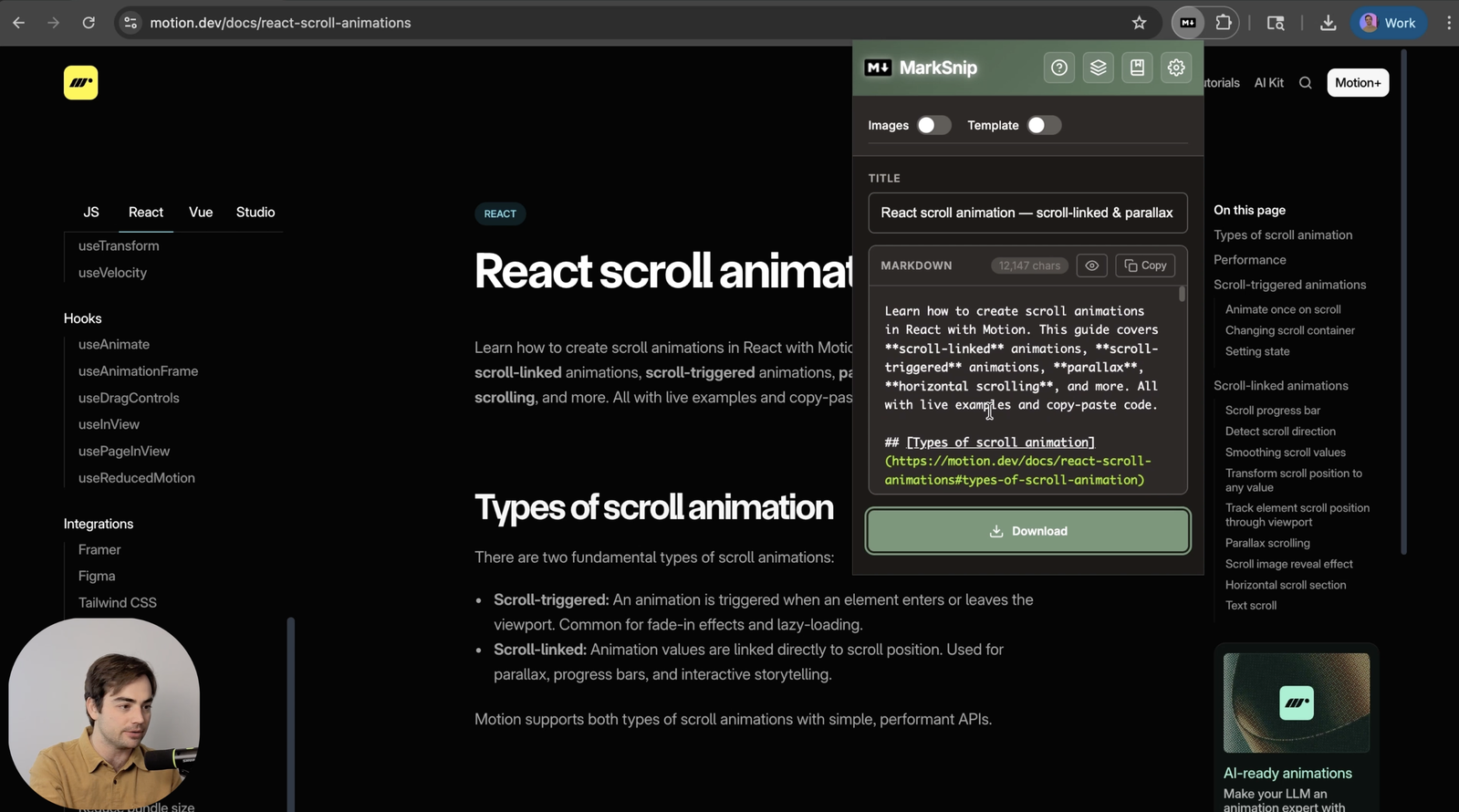
The Rundown In this guide, you will learn how to make your AI coding agent smarter with Marksnip by quickly downloading the docs pages you actually need and saving them inside your repo. This is one of the fastest ways to fight context rot in AI coding workflows because the docs live in your repo instead of disappearing in a thread. Who This Is Useful For Anyone coding with Codex, Claude Code, Cursor, or another agent  who is tired of re-pasting the same docs into every thread Operators or founders shipping integrations  who want the agent focused on the exact setup docs and API references that solve the problem Developers building over time in one repo  who want a context folder future agents can inspect instead of relying on whatever survived in chat history What You Will Build One reusable  agent-context/  folder inside your project with the exact markdown docs your coding agent should read first. In our test, that context helped Codex add a custom scrolling animation to a website using the React Motion docs, but the workflow works for any library or integration. What You Need A Chromium browser with  Marksnip  installed A project repo with a folder like  agent-context/  or  project-docs/ One docs page you actually need, such as setup docs, SDK docs, API reference, or a changelog Step 1 Install Marksnip and Pick the Right Page Install  Marksnip  from the Chrome Web Store, then open the docs page you actually need for the task in front of you. Good candidates are: setup guides SDK docs API reference pages changelogs technical blog posts with implementation details This is the first important mindset shift. You are not trying to download an entire library just because you can. You are choosing the pages you want to flag for the agent's attention so both of you are working from the same source of truth. Pro tip:  If you only need part of a page, Marksnip lets you clip either  Selection  or the full  Document . That is useful when a docs page is huge but only one section matters for the task. Step 2 Clip the Page Into Markdown Click the Marksnip icon in the browser toolbar and let it process the page. Under the hood, it runs the current page through Mozilla Readability and converts the extracted content to Markdown, which is why the output is much cleaner than a normal copy-paste. Step 3 Save It in a Stable Context Folder Drag the markdown file into your working repo and save it in a folder like  agent-context/ . That folder is the whole point. Now when you or a future coding agent opens the repo, there is a visible packet of trusted context sitting next to the code. Instead of hoping the model remembers what you pasted three threads ago, you have a durable system: the file stays in the project the source doc is obvious you can update the file when the docs change future agents can inspect the same context without you re-explaining everything If you are building something slightly more involved, add two to five files that cover the setup, the main API surface, and any recent changelog that affects your implementation. A good default habit is to make the folder first, then keep feeding it the pages that actually matter. That is what makes this feel like a real system instead of a one-off trick. Step 4 Tell the Agent to Read That Folder First Once the file is in the repo, point your coding agent at the folder and tell it to use those files as the source of truth. Use a simple prompt like this: Read the files in agent-context first and use them as the source of truth for this task. For example, if the  agent-context  folder has docs on how to install and use the React Motion library, you can tell Codex you want to add a scrolling animation into the site and have it work from those files first. In our test, that worked. The animation was added correctly using the docs we had just clipped into the project. That same pattern works for any integration. If you are wiring up a payments API, auth provider, analytics tool, or front-end library, the agent now has a cleaner starting point than a scraped docs page or a half-remembered thread. This is also why manual selection still matters even if some tools can fetch entire docs libraries automatically. Sometimes you want that automation. Other times you want to say, "These are the exact pages I think solve the problem. Start here." Step 5 Customize the Workflow to Match Your Setup Once the basic flow works, Marksnip has a few useful settings that make this system more reusable. Worth knowing about: Templates  let you prepend or append text to every file, which is useful for YAML front matter or a standard source block Title Template  controls the filename, so you can make your saved docs more consistent Downloads Subfolder  helps route files into a cleaner structure when you download often Markdown Options  let you change heading style, code block style, link style, image style, and other output details Images  can download images alongside the markdown when you are using  Downloads API  mode Send to Obsidian  works if you use the Advanced Obsidian URI plugin and want clipped pages to become notes instead of repo files Batch Processing  lets you convert multiple URLs at once if you are building a bigger context pack You don't need all of that for the core workflow. But it is worth knowing the settings are there. One especially useful toggle is  Template . If you turn that on, Marksnip can add front matter for Obsidian, which is nice if you use Obsidian as a notes reader instead of keeping everything in a repo. There is also a whole set of options for saved location, default title, and other file-level customization if you want your clipping workflow to be more organized. Going Further Marksnip is not just for coding docs. You can also use it to clip articles and Twitter threads, which is useful when you are working with an AI that cannot browse well or wastes too much time navigating junk and ads. Marksnip pulls out the meat. And if you want a more automated layer on top of this manual context system, pair it with a docs-aware tool like  Context7 . That gives you both sides of the workflow: automatic docs access when you want breadth, plus a context folder full of the exact pages you chose on purpose.

Save 15% on Thoughtly by joining The Runway University

Through our vast network of over 100 partnerships with major AI companies, we also offer University members free access or major discounts to the many popular AI tools along with AI certified courses, daily guides on AI tools and many more.

Tools
No items found.

AI training for the future of work.

Get access to all our AI certificate courses, hundreds of real-world AI use cases, live expert-led workshops, an exclusive network of AI early adopters, and more.
General

Coding