The Rundown AI / Guides / General / Create Ads and Marketing Videos in Minutes With Remotion

Create Ads and Marketing Videos in Minutes With Remotion

Try Text

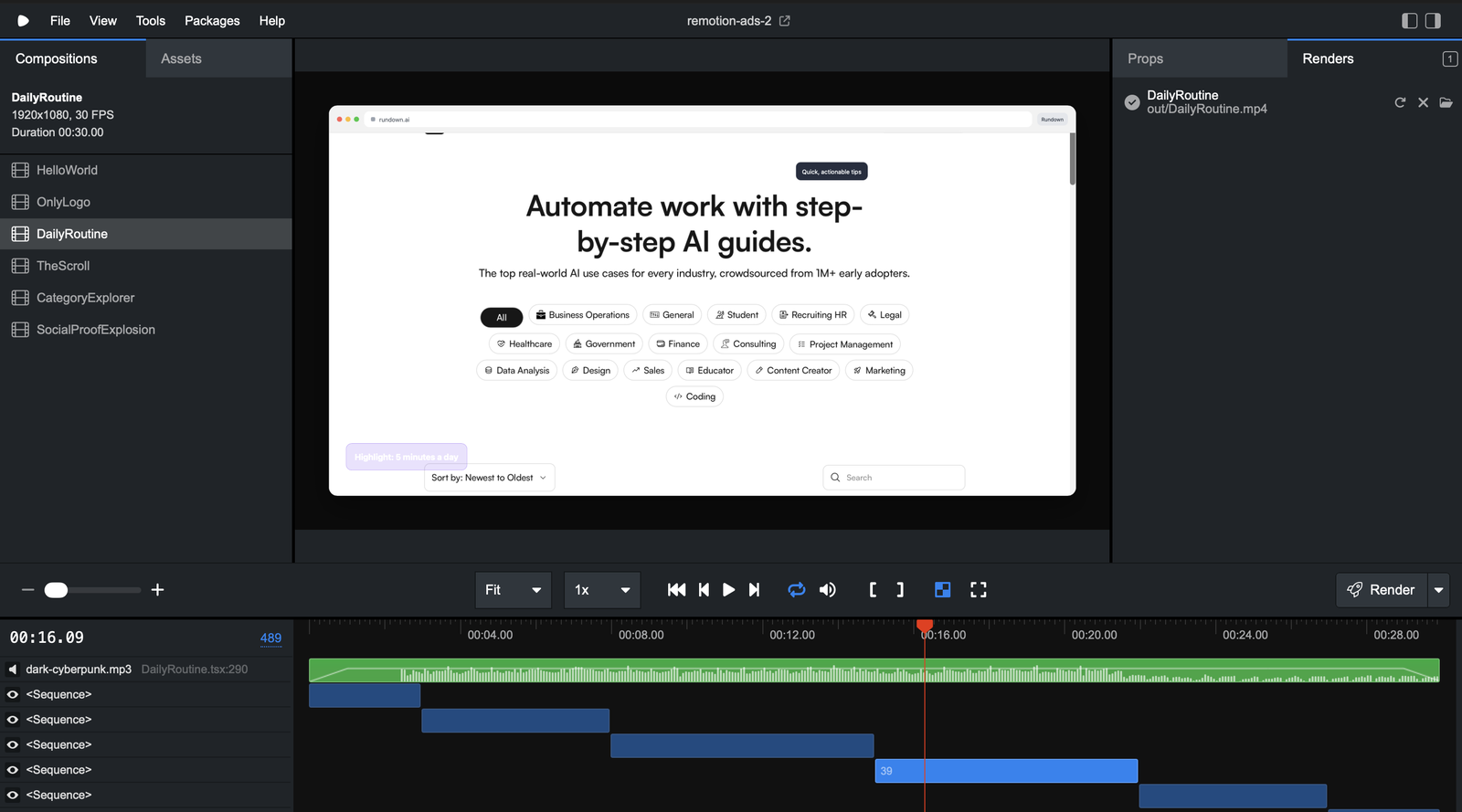
The Rundown In this guide you will learn how to programmatically generate ads and marketing videos with code. Using this workflow you will be able to conceptualize, template and generate dozens of videos in minutes and just a few dollars of tokens. Who This Is Useful For Marketers looking to test hooks and CTAs in their ads Business owners who want to automate content production Anyone who runs out of Sora tokens quickly What You Will Build What You Need to Get Started A code editor (we use Cursor) Codex, Claude Code or Cursor Agent (we use Codex) Step 1 Open your preferred AI chat tool. We recommend NotebookLM. Add in some screenshots of your website and products as sources. Link to your website too. 💡Pro tip: You can even link to YouTube videos in the style of the video you want to create! Tell NotebookLM to generate 5 concepts for promotional videos and ads for your brand, refine them as needed. Step 2 Now prompt:  ”Give me a prompt to instruct Codex on how to set up my repo and a plan to create all of those components and make those videos with remotion. Use remotion Codex to help with styling” You can replace Codex with Claude Code or Cursor if you prefer. The Remotion Skill works with those too. Step 3 Open terminal and execute this command:  npx create-video@latest It will ask you to make some choices and name your project. We are going to use the hello world template for this example. It will prompt you at the end to install the remotion skill, hit  enter . Otherwise, you can add the skill manually with  npx skills add remotion-dev/skills Hit  enter  again to open the project in your code editor. Step 4 Run these two commands to install and launch the Remotion editor:  npm install npm run dev Drop those markdown instructions from step 1. intro the root of your project Make sure to start a new git repo with  git init . This helps Codex with context. Now prompt Codex to read the PRD and create all the components needed for the video concepts. 💡Pro tip: If you want to include screenshots or even videos of your website/product you can drop those in the repo and ask codex to organize them for you! Step 5 Next tell Codex to create the video for the first concept. Once it’s done, make sure your server is running with  npm run dev . Open up  http://localhost:3000  in your browser. You should see a video editor and your generated video. You can click the rocket ship next to the video title on the left to render and export the video. You can also ask Codex to bulk render videos using the  npx remotion render [video name]  command. 💡Pro tip: You can click the format dropdown in the render menu to export your video as a gif. Going Further Search the web for some royalty free music or sound effects. Drop the mp3 files into your project folder and tell Codex to add them to one of your videos using the Remotion skill. It’s a good idea to add music and sound effect cues in your video scripts going forward!

Save 15% on Thoughtly by joining The Runway University

Through our vast network of over 100 partnerships with major AI companies, we also offer University members free access or major discounts to the many popular AI tools along with AI certified courses, daily guides on AI tools and many more.

Tools

No items found.
AI training for the future of work.

Get access to all our AI certificate courses, hundreds of real-world AI use cases, live expert-led workshops, an exclusive network of AI early adopters, and more.
General