The Rundown AI / Guides / General / Create a Custom, Royalty-Free Jingle in 30 Seconds
Create a Custom, Royalty-Free Jingle in 30 Seconds

Create a Custom, Royalty-Free Jingle in 30 Seconds

Try Text

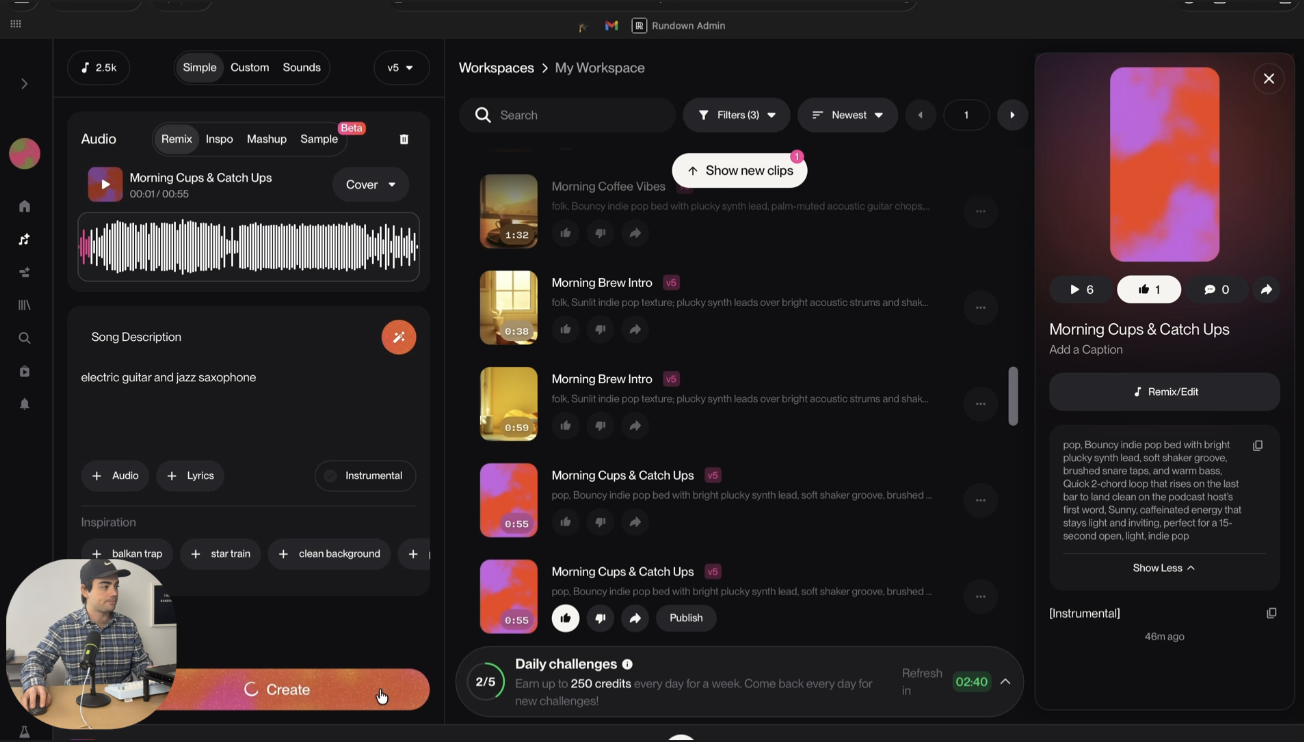
The Rundown In this guide you will use Suno AI to create a jingle, background music and sound effects for your brand. The best part is they’re all royalty-free and can be created from basic text prompts. Who This Is Useful For Podcasters  who need an intro, outro, and transition sounds that actually sound like their brand Content creators  who want cohesive audio across YouTube, TikTok, and ads without licensing headaches Small business owners  who need hold music, ad background audio, or a jingle and don't want to pay $500 on Fiverr What You Will Build A set of brand audio assets: a main jingle, a couple of variations with different instruments, and short audio stings for transitions and logo reveals. All from text prompts in Suno. What You Need to Get Started Suno  account (free works, Pro is $10/mo) An idea of your brand's vibe (genre, energy, mood) CapCut, TikTok, or any video editor if you want to add the audio to video Step 1 Generate Your First Jingle Go to  suno.com  and click  Create . Describe your song in the prompt box. Here's an example: Upbeat indie pop podcast intro with acoustic guitar and light percussion. Energetic but not overwhelming. Think tech podcast. Click  Create  and Suno will generate your song. It will take 20-30 seconds (crazy right?!). It shows up in the sidebar. Then you will see two variations appear in the feed. If you want to refine the song, the easiest move is to swap out instruments. Here’s some things you can try: Add in synth plucks Switch acoustic guitar to electric, Remove percussion. Small changes to the instrument list give you noticeably different results. Pro tip:  If your first prompt comes out too cheesy, try changing the brand descriptor at the end. "Morning coffee vibes" sounds very different from "tech podcast." Step 2 Remix Into Brand Variations Now you should have a single song or jingle that you like best. Here’s the secret sauce for creating a cohesive sonic brand. Click the  Remix and Edit  button on your song. Then select  Cover.  Here you can try different instruments and genres in the prompt. Suno will regenerate the same exact melodic structure but with different instruments. It sounds different but recognizably related to the original. You can use this to make variations of one jingle for multiple different ads. Maybe an orchestral version for a Tik-Tok video, a synth-wave variation for a YouTube video, call holding music for background audio in a podcast. Step 3 Create Short Stings and Sound Effects This is a slightly hidden feature in Suno. Instead of creating a song, click into  Sounds . Type a description of the sound effect you want: Punchy, memorable audio sting. Works as a transition sound. Synth pluck. You can choose between  One Shot  (a single sound effect) and  Loop  (audio that can repeat seamlessly). For stings and animated logo videos (like in our video guide), you want One Shot. Hit create and Suno generates a short audio clip. If you find one you like but it's not long enough for the clip you want to put it over, click the  three dots , then  Remix and Edit , then  Extend . Suno will make it longer while keeping the same sound. Like the ones you want and add them to a playlist. When you're ready, go to your  Library , find your favorites, and click  Download . From there, drop them into CapCut, TikTok, or whatever editor you use. Layer them over logo animations, video ads, or use them as podcast transitions. Step 4 Organize Your Sounds Like the ones you want and add them to a playlist. When you're ready, go to your  Library , find your favorites, and click  Download . From there, drop them into CapCut, TikTok, or whatever editor you use. Layer them over logo animations, video ads, or use them as podcast transitions. Going Further Pair with AI video.  Generate logo animations in Higgsfield or video ads with Gemini. Then layer your Suno audio on top in CapCut. Everything is AI-generated, everything is royalty-free, and it all sounds and looks like you paid a production team.

Save 15% on Thoughtly by joining The Runway University

Through our vast network of over 100 partnerships with major AI companies, we also offer University members free access or major discounts to the many popular AI tools along with AI certified courses, daily guides on AI tools and many more.

Tools

No items found.
AI training for the future of work.

Get access to all our AI certificate courses, hundreds of real-world AI use cases, live expert-led workshops, an exclusive network of AI early adopters, and more.
General

Content Creator