The Rundown AI / Guides / General / Code From Your Phone With OpenAI’s Codex
Code From Your Phone With OpenAI’s Codex

Code From Your Phone With OpenAI’s Codex

Try Text

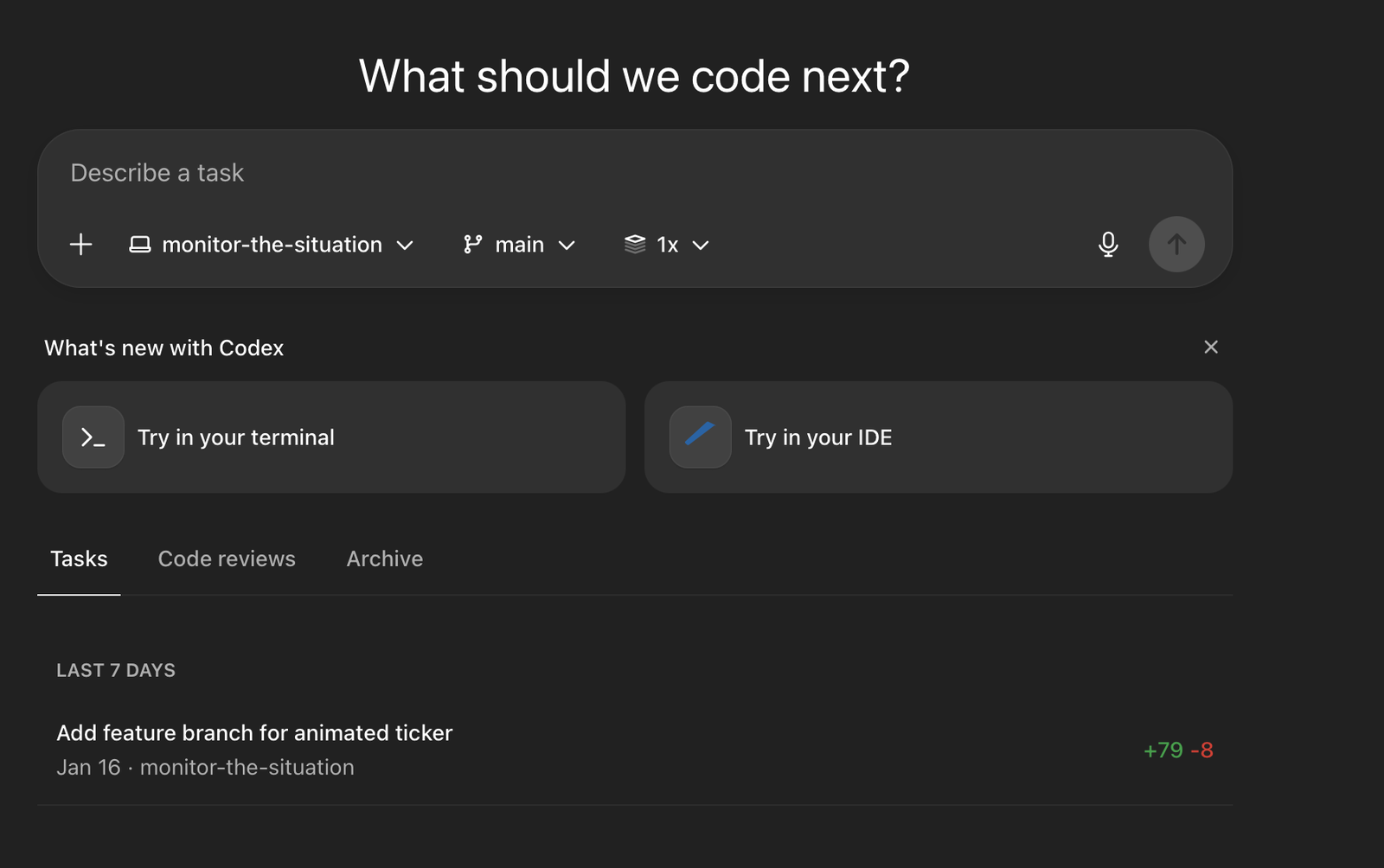
The Rundown In this guide, we'll teach you how to 10x your code output with Codex. We’ll get you setup with it in Cursor, then walk you through how to run it in the cloud using your phone. You’ll even learn how to setup an agent that automatically reviews your code for you. Who is this useful for Developers who want AI coding help but find terminal-based tools intimidating ChatGPT Plus/Pro subscribers who haven't tried Codex yet Anyone curious about AI coding agents What You Will Build You'll install Codex, connect it to a project, and have it create an  AGENTS.md  file. That's the configuration file that tells Codex about your project. Then you'll explore slash commands and set up automated code reviews. What You Need to Get Started A ChatGPT Plus account ($20/month) Cursor or another supported code editor (VS Code, Windsurf, etc.) A GitHub account (optional) Step 1 Choose Your Version Codex comes in three versions: Codex CLI  runs in your terminal. Codex Cloud  runs in your browser at  chatgpt.com/codex . Codex IDE Extension  runs in your IDE as a chat window For this guide, we're using the Cursor extension because it displays your agent chat separate from your terminal. This keeps everything nice and tidy. If you use VS Code or Windsurf, you will be able to follow along as well. Go to  https://developers.openai.com/codex/quickstart/  and select your IDE. Follow the brief download instructions. Step 2 Codex Project Setup Open a project in Cursor. Press  CMD+Shift+P  and search Codex. Select New Codex Agent. You should see a window open that looks like this. Tell the agent to create an  agents.md  file based on the project files. If you’re starting from scratch you can give it your PRD or spec sheet instead. After it creates the  agents.md  file, you should tell it to initialize git and write a commit, if you haven't yet. Step 3 Slash Commands You can click the slash button to see commands. Here are the important ones: /review Quick code review of your changes /status Shows context limit (%) and your 5-hour usage limit /mcp Shows connected MCP servers /context Toggle auto-context from recent files Here’s a  link  to the official documentation for all slash commands Step 4 Use Codex From Anywhere Go to  https://chatgpt.com/codex/settings/connectors  and connect your GitHub account. This lets Codex access your repositories and create pull requests from its work. Tasks run in isolated cloud sandboxes so your local machine stays free. Now you can access Codex from anywhere by going to  chatgpt.com/codex . Just select a repository and a branch and give it a prompt. It will run the code in a virtual environment. You can edit your project-specific  virtual environments  so Codex can use your API keys or browse the web. Step 5 Automatic Code Reviews This is where Codex shines. You can have it automatically review every pull request in the cloud: Go to  https://chatgpt.com/codex/settings/code-review Enable automatic code reviews on new PRs Flip Auto code review to “Review my PRs” for your repo Now whenever you open a pull request, Codex will automatically review it. Going Further Token-Saving Hack Cloud-based Codex calls (from the web or other connectors) don't count against your 5-hour local limit. Use this workflow to save tokens: Code locally using Codex in Cursor. When you finish a feature, tell Codex: "Commit these changes to a new branch and submit a new pull request". The cloud agent automatically reviews your PR for free. You can follow along in the Github app or website.

Save 15% on Thoughtly by joining The Runway University

Through our vast network of over 100 partnerships with major AI companies, we also offer University members free access or major discounts to the many popular AI tools along with AI certified courses, daily guides on AI tools and many more.

Tools

No items found.
AI training for the future of work.

Get access to all our AI certificate courses, hundreds of real-world AI use cases, live expert-led workshops, an exclusive network of AI early adopters, and more.

General