The Rundown AI / Guides / General / Build a Competitor Database with Claude Cowork

Build a Competitor Database with Claude Cowork

Try Text

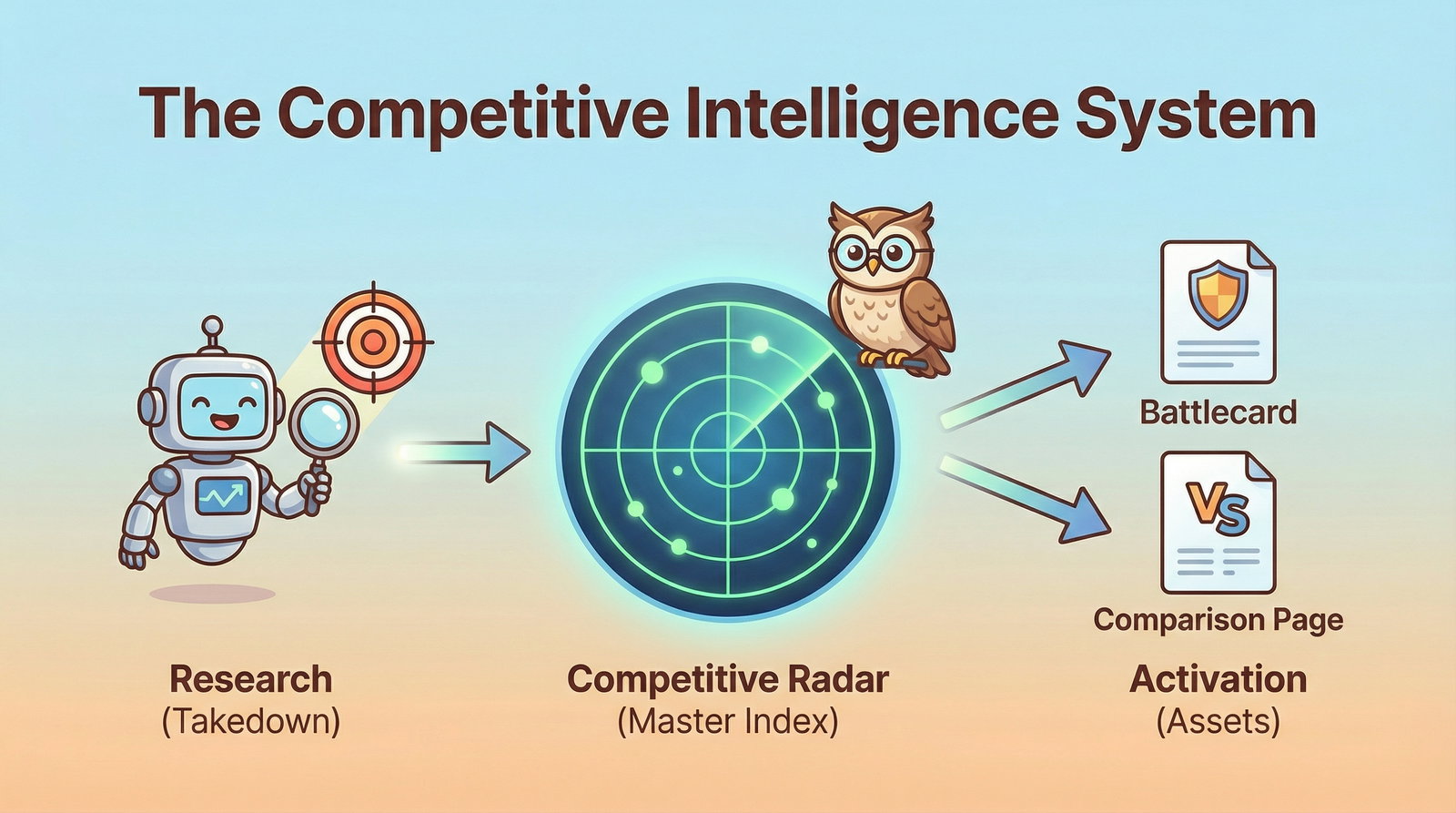
The Rundown In this guide you will learn how to set up a competitor intelligence database powered by Claude Cowork. The best part? It builds itself. Simply download the prompt files and tell Claude to set it up. It will be ready to use in 5 minutes. Who This Is Useful For Founders and Executives who want a “live radar” of market threats Sales teams who need battlecards for handling objections Small teams without an established competitor research system What You Will Build What You Need to Get Started Claude Desktop app (only works on Mac) The Prompt Kit  (attached) A text editor to view your database Step 1 Setup Create a new folder named “competitor_teardowns”. Download the prompt kit. It should have 6 markdown files. Drop them in your folder. Open the Claude Desktop app and click the “Cowork” tab. Click the folder button and select your new folder. Prompt Claude: Read the SOP file and structure our folder as outlined in the SOP. Step 2 The Report Now that your system is built, let’s run an analysis. It’s called a “killsheet”. Don’t be alarmed, a killsheet is simply a term for a forensic business analysis of your competitors. We like to use the latest Opus model for these. Killsheet When to use:  Quarterly review, new competitor funding news, or loss of a major deal. Select Target:  Identify Name + URL. Type and send:  Start an analysis on [competitor] using [competitor domain] [any extra competitor domains] 💡 Pro Tip:  Before running your first analysis, create a small text file called  Context.md  describing your own company and offer. This helps Claude understand who "we" are when identifying threats. You can even dictate this into Claude to have it write the file for you. Step 3 Results Now open your competitor_teardowns folder in a code editor like Cursor. You should see a new competitor folder in 01_Competitors complete with a dated killsheet. Each time you run a killsheet analysis Claude will update your "Competitive Radar" document. This is your at-a-glance overview. 💡Pro tip: You can tell Claude to convert any report into a pdf or to update its SOP to do so automatically. Step 4 The Followup After you have your killsheet, arm your sales and marketing teams by running these prompts: Prompt_03_Battlecard_Generator.md For sales:  Create scripts for your sales team based on competitor objections. Prompt_04_Comparison_[Page.md](<http://Page.md>) For marketing:  Claude will mock up a landing page comparing you + competitor or competitor + competitor. Going Further Drop your updated killsheets into NotebookLM and use it to generate quarterly competitor intelligence reports. We like the slide deck tool and the podcast tool!

Save 15% on Thoughtly by joining The Runway University

Through our vast network of over 100 partnerships with major AI companies, we also offer University members free access or major discounts to the many popular AI tools along with AI certified courses, daily guides on AI tools and many more.

Tools

No items found.

AI training for the future of work.

Get access to all our AI certificate courses, hundreds of real-world AI use cases, live expert-led workshops, an exclusive network of AI early adopters, and more.
General