The Rundown AI / Guides / General / Write Viral YouTube Scripts With This Free Tool
Write Viral YouTube Scripts With This Free Tool

Write Viral YouTube Scripts With This Free Tool

Try Text

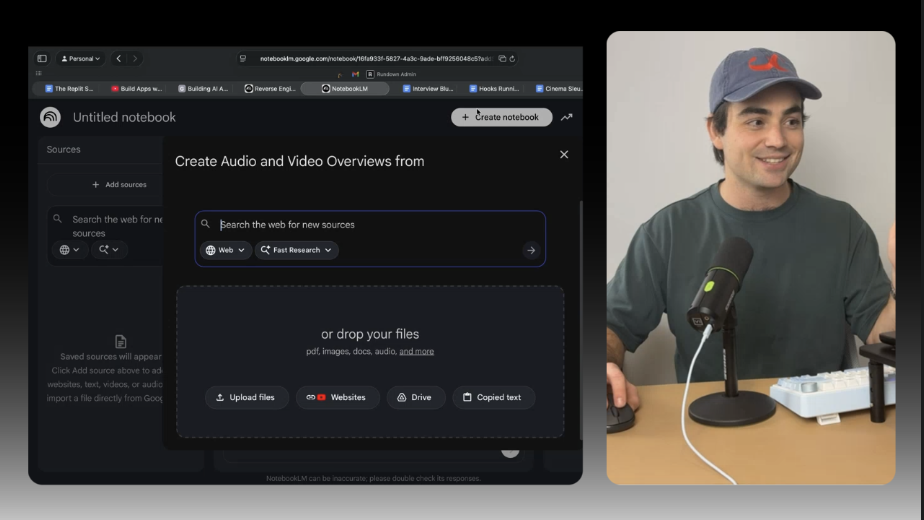
The Rundown In this guide, you will learn to use NotebookLM to “watch” YouTube videos for you, then turn them into ideas and scripts for your own videos. Just drop in any YouTube video and it will extract the formula that made it successful. You will also learn how to turn this formulas into “blueprints” for better script-writing. Who This Is Useful For Product managers who want tighter product announcement videos Video interviewers who need help structuring their interviews Anyone who records YouTube content What You Will Build A smart notebook that reverse-engineers videos and creates “blueprints” you can use to draft video scripts. What You Need to Get Started Google Workspace or Gmail account A video idea or two Step 1 Find a long-form YouTube video that you like the structure of. Go to  notebooklm.google.com  >  Create new  >  Add sources  >  Websites  and paste the link in. Create a note with a brief summary of your brand, your content vision and your audience. Click the  three dots  >  Add as source . Pro tip: To give NotebookLM more context you can add your website link and upload any PDF as sources. Step 2 Make sure the YouTube video and your brand statement are selected. Put this prompt into the chat: Reverse engineer the structure of this video. Turn it into a blueprint that outlines the structure so I can use it for [my brand] content. Take note of the different scenes and possible angles for a video structured like this. Now click  Save to note  in the chat. Rename the note “Blueprint 1” and click the  three dots  >  Convert to source. Pro tip: You can also click the three dots on a note to export it as a Google Doc or Sheet. Step 3 Now we have a modular blueprint that we can use to write scripts on any topic. Let’s try one. De-select the YouTube video in the sources pane so that just your brand statement and blueprint 1 are selected. Send a prompt like this: Use blueprint 1 to create an outline, a script and four video titles for my brand on the topic of [your topic]. Now you can export the script to Google Docs and edit it. The idea is to build up a library of blueprints that you can use to try different video angles. A good example is product announcements. You can make a bespoke notebook just for this use case. Take several product announcement videos that you like and turn them into blueprints. The next time your company needs to script one, try a couple blueprints out in your Notebook. Going Further You can have NotebookLM analyze your videos and keep a running list of feedback. Try linking to one of your videos and prompting something like: Watch this video and give feedback on engagement. Highlight specific areas of high engagement that could work as hooks for short-form videos.” Now, copy those hooks into a Google Doc titled “Running List of Hooks”. Click  Add sources  >  Drive  and select that document. Now your Notebook will get smarter as you analyze more videos, without cluttering up your sources.

Save 15% on Thoughtly by joining The Runway University

Through our vast network of over 100 partnerships with major AI companies, we also offer University members free access or major discounts to the many popular AI tools along with AI certified courses, daily guides on AI tools and many more.

Tools

No items found.

AI training for the future of work.

Get access to all our AI certificate courses, hundreds of real-world AI use cases, live expert-led workshops, an exclusive network of AI early adopters, and more.
General

Content Creator