OpenAI's robotics lead exits over Pentagon deal
PLUS: How to build an AI case study generator

Zach Mink
March 9, 2026
Read Online | Sign Up | Advertise

Good morning, AI enthusiasts. The consumer backlash over OpenAI's Pentagon deal was loud, but this weekend marked an internal escalation: the company's robotics hardware lead resigned on principle.
Caitlin Kalinowski's departure is the first senior-level exit tied directly to the deal, and her public statement citing concerns over surveillance and lethal autonomy hits a bit harder than any App Store chart.
In today’s AI rundown:
OAI's robotics lead exits over Pentagon deal
The Rundown Roundtable: Our AI use cases
How to build an AI case study generator
Claude digs up 22 Firefox security flaws in two weeks
4 new AI tools, community workflows, and more
LATEST DEVELOPMENTS
OPENAI
🚪 OAI's robotics lead exits over Pentagon deal

Image source: Lovart / @kalinowski007 on X
The Rundown: OpenAI robotics director Caitlin Kalinowski just announced her resignation over the company’s controversial Pentagon deal, calling it a rushed move that skipped the guardrails on AI surveillance and lethal autonomy.
The details:
Kalinowski joined OAI from Meta's AR glasses team in November, spearheading the rebuild of its robotics division that had previously shut down in 2020.
She called the decision "about principle, not people", saying the deal was pushed through "without the guardrails defined" on AI in warfare.
Kalinowski marks the first public “resignation” over the Pentagon deal, though VP of Research Max Schwarzer also departed last week for Anthropic.
The backlash has hit fast on the consumer end, with Claude climbing to No. 1 on the App Store and ChatGPT cancellations soaring.
Why it matters: Plenty of users have ditched ChatGPT and spoken out since the Pentagon deal dropped — but Kalinowski is the first senior OAI voice to walk over it on principle. OAI can weather angry tweets and App Store slides, but a big resignation letter that name-drops "lethal autonomy" and "surveillance" hits a bit differently.
TOGETHER WITH YOU.COM
📖 AI Agents are your new employees
The Rundown AI agents are entering the workforce, but you wouldn’t expect a new employee to know everything on day one, would you? AI agents need onboarding too—in the form of metadata.
In this eBook, you’ll learn:
How metadata management drives AI success
Common pitfalls
The ROI of proper metadata management
THE RUNDOWN ROUNDTABLE
💡The Rundown Roundtable: Our AI use cases
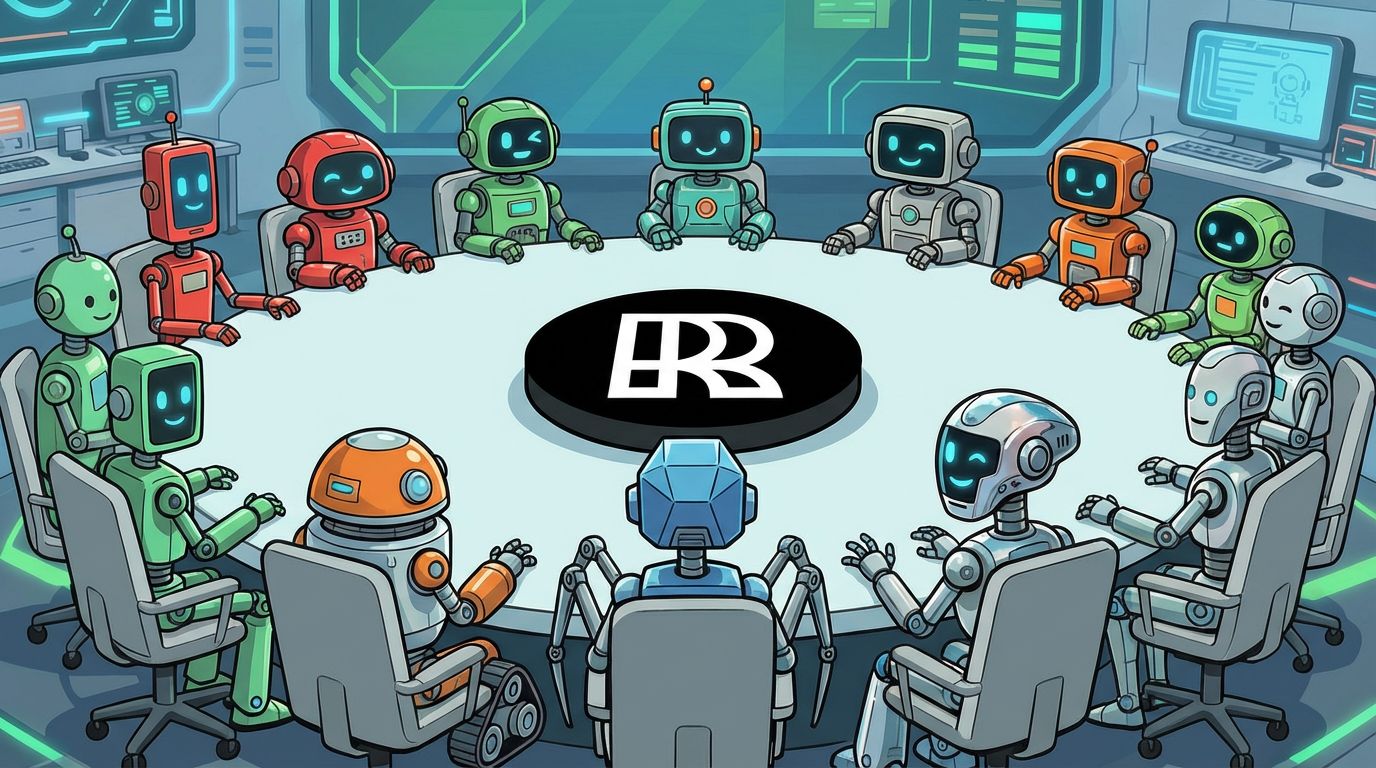
The Rundown: The Rundown Roundtable is a weekly feature where we poll members of The Rundown staff about how we use AI in our work and daily lives.
Rishi, Growth: We’re always looking for A/B test ideas for our landing pages and new ways to improve conversion rates while creating a better user experience. Recently, I tried an interesting AI workflow after coming across a public CRO skill on Twitter.
I installed it in Claude Code and then fed Claude screenshots of our landing page along with behavioral data from Microsoft Clarity, including scroll depth, heatmaps, and which buttons people were clicking most.
Using the CRO scorecard framework and the Clarity data, Claude generated a detailed analysis of the page and recommended five A/B tests we should prioritize, along with the reasoning behind each one. The insights were genuinely useful, and we have already taken action by launching one of the recommended tests.
Adrian, Developer: I’ve basically had the exact same haircut since high school, so this year I finally decided to experiment a bit with Nano Banana 2 and see what a different look might feel like. I uploaded my own portraits and started merging them with different models’ hairstyles. After 10+ rounds of virtual makeovers, I found out that the hairstyle that suited me best was… my current one.
AI TRAINING
⚙️ Build an AI case study generator

The Rundown: In this guide, you will learn how to use Claude to turn those old project files, like client emails, metrics exports, or memos, into information-rich case studies you can use to win more proposals.
Step-by-step:
Write project wrap memos when a project ends. Give an overview of results and key KPIs. If you’re busy, even a quick voice memo is better than nothing
Create a “Case Study Generator” project in Claude’s PC app with instructions: "You are a case study writer for [industry]. Your job is to take raw data and turn it into a case study using the challenge → solution → results framework"
Upload your project memo and prompt: “Generate a case study from these docs. Lead with strongest results in the headline. Use the challenge → solution → results framework. If any section is missing data, flag it with [NEEDS INPUT]”
Claude should generate a PDF case study for you. We found that it did a great job turning the memo into a slide deck or social media carousel post
Pro tip: We can pack a lot more into our system instructions, including a style guide and example cases. You can grab the templates here.
PRESENTED BY IBM
💪 How to build a strong AI-ready data foundation

The Rundown: IBM explains how unified, secured, and governed data access can help organizations move promising AI pilots to reliable enterprise scale.
In this guide, you’ll:
Understand barriers that prevent AI pilots from scaling
Learn why unified access to structured and unstructured data matters
Explore a framework for building AI-ready data foundations
ANTHROPIC & FIREFOX
🔒 Claude digs up 22 Firefox security flaws in two weeks
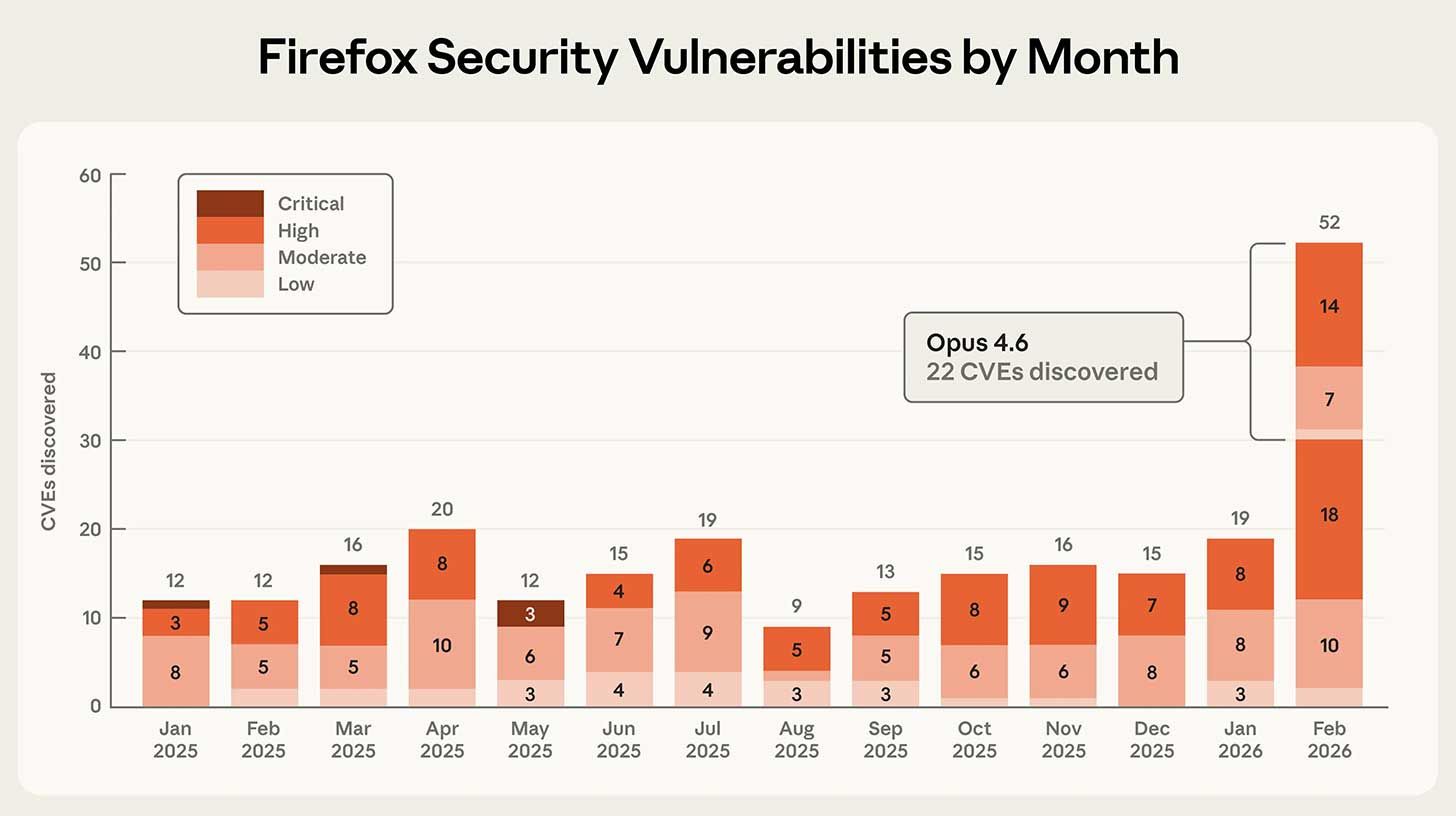
Image source: Anthropic
The Rundown: Anthropic revealed that Claude Opus 4.6 spent two weeks tearing through Firefox's codebase alongside Mozilla's team, turning up 22 vulnerabilities (14 high-severity) — with patches already live for hundreds of millions of users.
The details:
Claude took just 20 minutes to flag its first flaw, and racked up 50 more by the time Anthropic's team finished confirming its initial find was real.
Anthropic filed 112 reports across ~6K files in total — 14 rated high-severity by Mozilla, accounting for nearly 20% of Firefox's most serious patches all year.
Claude also tried writing exploits, but only managed two working attacks in hundreds of attempts — both needing Firefox’s sandbox removed to function.
Why it matters: Firefox isn’t some new app; it’s a deeply tested open-source project with decades of audits and bounty programs — making Claude’s quick findings even wilder. While Claude wasn’t as strong at weaponizing its own exploits, Anthropic said that gap won’t last… Meaning the window to lock down codebases feels pretty urgent.
QUICK HITS
🛠️ Trending AI Tools
🗣️ Unwrap Customer Intelligence - Connect your entire organization to the true voice of the customer with AI-driven insights from customer feedback*
🔒 Codex Security - OpenAI's security agent to scan repos and patch bugs
⚙️ autoresearch - Andrej Karpathy's tool for AI-driven LLM training
🎆 Uni-1 - Luma’s model that reasons and generates across text and images
*Sponsored Listing
📰 Everything else in AI today
Luma unveiled Uni-1, its first model that combines reasoning and image generation in one architecture — in a major shift from the video-focused startup's roots.
Anthropic rolled out scheduled tasks in Claude Code, letting the coding agent run prompts on a loop to monitor builds, check logs, and auto-file PRs on a set cadence.
Cluely CEO Roy Lee admitted to fabricating the startup's revenue figures in a 2025 interview, publicly retracting claims after the AI ‘cheating’ tool pivoted to meeting notes.
The WSJ shared more on AI's role in the Iran conflict, reporting that the Army's 18th Airborne matched its Iraq-era targeting with 20 people instead of 2,000 with the tech.
Andrej Karpathy released autoresearch, an open-source repo that lets AI agents autonomously run and iterate on LLM training experiments in a loop on a single GPU.
COMMUNITY
🤝 Community AI workflows
Every newsletter, we showcase how a reader is using AI to work smarter, save time, or make life easier.
Today’s workflow comes from reader Julie H. in Kyle, TX:
"I made a day planner agent connected to my calendar and task lists. Every morning, I start by asking, “How does my day look?”, and the agent pulls all my meetings, uses my tasks list to schedule projects in between meetings, gives me time for deep focus and email catch-up, and even makes sure to schedule a lunch break.
It flags things I may have missed the day before. If I have big gaps in the day, it looks ahead and suggests items I can get ahead on, like tasks due the next day or meetings needing prep time. I can give feedback on things I want to add, move, or remove, and it adjusts until I have a solid plan for my day. If I move things in my schedule, it will also update my calendar and task list for me so everything stays aligned."
How do you use AI? Tell us here.
🎓 Highlights: News, Guides & Events
Read our last AI newsletter: OpenAI’s ‘best model ever’ goes live
Read our last Tech newsletter: Meta sued over Ray-Ban privacy
Read our last Robotics newsletter: Waymo has a big problem in Austin
Today’s AI tool guide: Build an AI case study generator
RSVP to our next workshop Thursday @ 2PM EST: AI coding bootcamp pt. 1
See you soon,
Rowan, Joey, Zach, Shubham, and Jennifer — the humans behind The Rundown




Stay Ahead on AI.
Join 2,000,000+ readers getting bite-size AI news updates straight to their inbox every morning with The Rundown AI newsletter. It's 100% free.